
At tax time
Your donations, ready for tax time.
Share a year-end report with your tax advisor, or choose a free copy-and-paste guide or Pro automated entry for TurboTax Desktop or Online.
Three paths
Pick the path that fits how you file.
Someone files for me
Save the year-end report as a PDF and email it, or print it, for your tax advisor.
Hand it to your tax advisorI use TurboTax Desktop
Use the free copy-and-paste guide, or use Pro automated entry with the DeductIt helper for Mac and Windows.
Compare Desktop transfer optionsI use TurboTax Online
The DeductIt browser extension fills your donation entries in TurboTax Online. Review the completed entries before continuing.
Add the extensionPath 1
Hand it to your tax advisor.
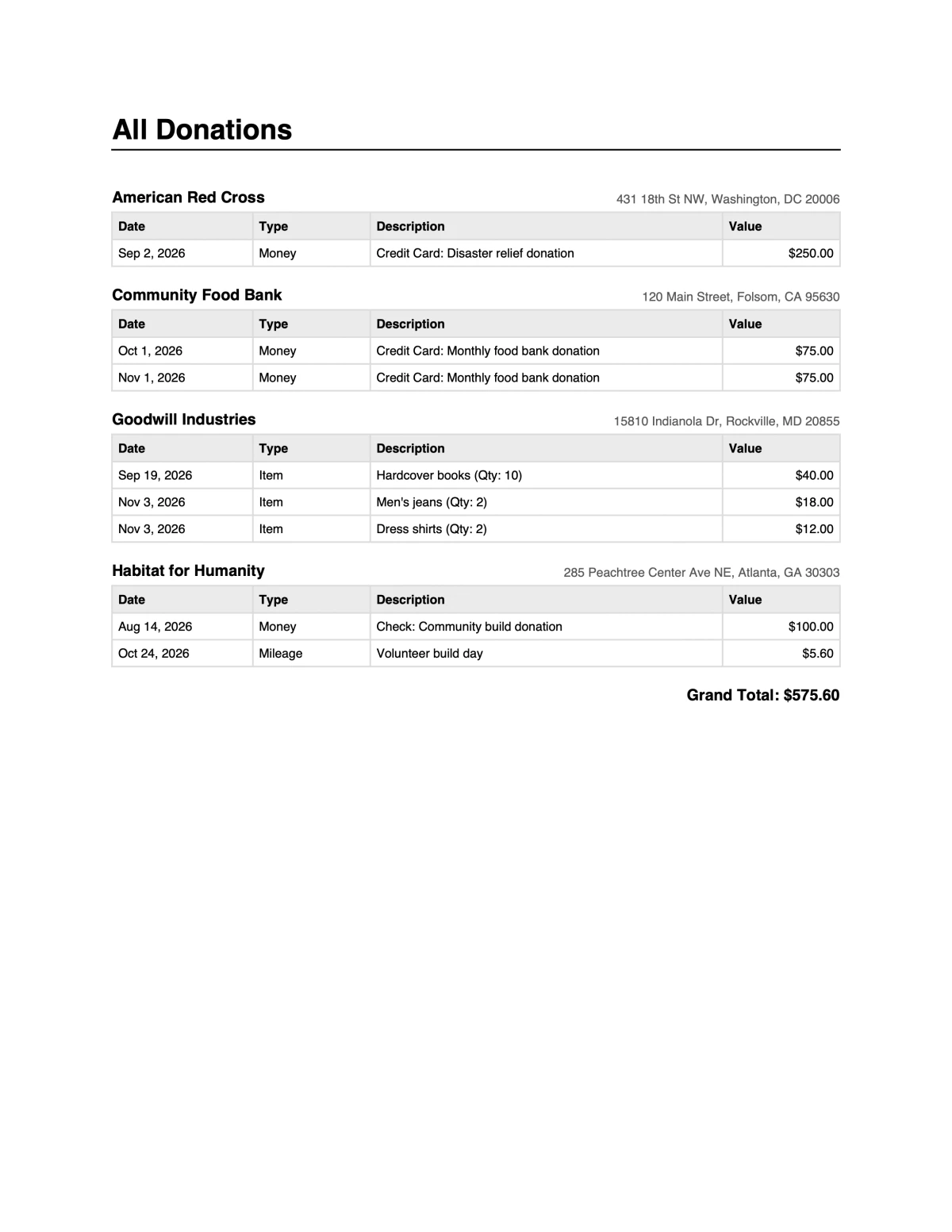
Share the year’s donation dates, charities, descriptions and values in one PDF. Keep a copy with your tax records.
View a sample PDF report →- 1Open Tax reports, choose the tax year and select PDF.
- 2Save it as a PDF and email it, or print it.
- 3Filing yourself with other software? Export a CSV, or a TXF file for TurboTax (Supporter).
Path 2
TurboTax Desktop, on Mac and Windows.
Start with the free copy-and-paste guide in Tax reports, or use Pro automated entry with the DeductIt helper app for Mac and Windows.
Open Desktop transfer optionsIf you choose automated entry:
- 1Download the DeductIt Tax Helper for Mac or Windows, then follow the in-app connection steps.
- 2Open your return in TurboTax Desktop and go to charitable donations.
- 3Load your exported donation guide into the helper, choose the charities to transfer, then select Start Automation. Review the entries in TurboTax.
Path 3
TurboTax Online, in your browser.
The DeductIt extension fills donation entries in TurboTax Online. Review the completed entries before continuing.
- 1Install the DeductIt browser extension in Chrome or Microsoft Edge, then load your donation guide.
- 2Sign in to TurboTax Online and open Deductions & Credits › Donations to charity.
- 3Load your donation guide into the extension and follow its prompts. Review completed entries before continuing.
What gets entered, and what stays with you.
| Entered into TurboTax | Where it comes from |
|---|---|
| Charity name | As saved in DeductIt |
| Date of the donation | The donation record |
| Kind: money, items, mileage, stock | The donation record |
| Amount or value | Your amount, or the item values you checked |
| For items: description, quantity, condition, value method | Item descriptions, quantities and values |
| Receipts and photos | Stay in DeductIt — TurboTax does not take attachments |
You stay in control
- DeductIt never files anything. You review every entry in TurboTax before you file.
- You can stop a transfer. Before trying again, check any partially entered charity in TurboTax and follow the helper’s recovery instructions.
- Review the records and transfer method before starting. Read our privacy policy.
- Using other tax software, or filing on paper? Export the PDF and CSV any time; Supporters can export a TXF file for TurboTax.
TurboTax and ItsDeductible are trademarks of Intuit Inc. DeductIt is not affiliated with, endorsed by, or sponsored by Intuit.
Tax-time questions
Which TurboTax editions and years work?
All TurboTax Desktop editions and TurboTax Online, for tax years 2025 and 2026. The helper and the extension are updated each season.
Is this the same as the old ItsDeductible import?
No. DeductIt offers free copy-and-paste guides and Pro automated entry for TurboTax Desktop or Online. Supporters can also export a TXF file.
What if TurboTax changes its screens?
The helper and the extension are updated each tax season. If a screen is not recognised, the send stops and tells you where it got to.
Can my tax advisor use it?
Yes. Save the year-end report as a PDF and email it, or print it. The report includes donation dates, charities, descriptions, values and totals. Keep receipts with your supporting records.
Which plan do I need?
PDF and CSV reports are free. TXF export for TurboTax is part of Supporter. Automated entry with the Desktop helper or Online browser extension requires Pro. Manual copy-and-paste guides are free.
Does DeductIt give tax advice?
No. DeductIt organizes your records and enters them where you tell it to. Talk to a tax professional about your deduction.